E-commerce A/B testing guide: Expert tips, tools, and examples
If your e-commerce A/B tests keep "winning" but your revenue doesn't move, you're probably testing the wrong things or stopping too soon. Here's what separates a test that actually pays off from one that wastes traffic.






Published July 13, 2026

Every online store loses revenue to friction it can't see. A confusing shipping message, a cluttered product page, an extra field at checkout: each one quietly pushes shoppers away before they buy. E-commerce A/B testing is how you find that friction and prove, with real visitor data, whether removing it actually moves the needle.
Unlike testing on a lead-gen site or a SaaS product, e-commerce testing has one advantage: every experiment can be measured against hard revenue, not a proxy metric like a form fill. That direct line from test to transaction is what makes it one of the highest-ROI investments a store can make.
What is e-commerce A/B testing?
E-commerce A/B testing is the practice of showing two versions of a storefront page, a product page, cart, checkout step, or pricing display, to separate groups of visitors, then measuring which version drives more purchases, revenue, or average order value.
One group sees the original (the control), the other sees a single, deliberate change (the variation), and traffic is split randomly between the two so the result reflects the change itself rather than who happened to see it.
What sets e-commerce testing apart?
- Multi-step conversion paths: A purchase moves through product discovery, a product page, a cart, and checkout, so a single test can affect behavior several steps downstream from where the change was made.
- Revenue as the primary metric: Instead of optimizing for a click or a lead, you can tie almost every test directly to purchases, average order value, and lifetime value (LTV).
- High, compounding traffic: Even mid-sized stores often see tens of thousands of monthly sessions, which gives tests the statistical power to reach significance faster than lower-traffic B2B sites.
- Platform constraints: Shopify, WooCommerce, Magento, and headless setups each have their own limitations on what you can test and how cleanly you can implement it without touching core code.
That combination is exactly why conversion funnel analysis matters so much in e-commerce. A test that lifts add-to-cart rate but drags down checkout completion hasn't actually fixed anything, it's just moved the friction one step further down the funnel.
What to test across the e-commerce funnel
Almost every stage of the shopping journey can be tested, but not every stage deserves equal attention. Where to start often comes down to which pages already have some momentum behind them.
Romi Hector , CRO Specialist at CROforce
With that in mind, start with the pages that carry the most traffic and the most drop-off, then work outward:
- Product pages (PDPs): Image count, zoom and video, where reviews sit relative to the buy box, and how specs versus benefits are ordered.
- Pricing and value framing: Bundle pricing, "starting at" language, and how discounts or subscription savings are displayed next to the price.
- Cart experience: Mini-cart behavior, upsell placement, quantity editing, and whether a progress-to-free-shipping bar changes basket size.
- Checkout flow: Guest checkout visibility, number of form fields, one-page versus multi-step layout, and payment method ordering. This is one of the highest-leverage areas in the entire funnel, and checkout optimization deserves its own dedicated testing roadmap.
- CTA copy and placement: "Add to cart" versus "Buy now," sticky versus static buttons on mobile, and button color or contrast.
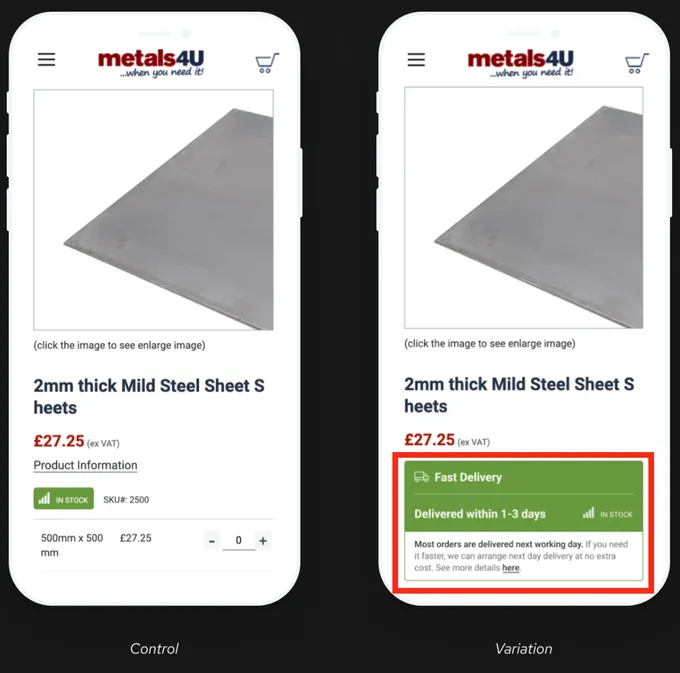
- Trust and urgency signals: Stock counters, delivery estimates, return policy visibility, and security badges near the payment step.
- Mobile-specific flows: Since mobile sessions often convert differently than desktop, dedicated mobile testing is usually needed rather than assuming a desktop win will translate.
» Running tests on an e-commerce store? See how to A/B test your Shopify store for more sales.
How to run an e-commerce A/B test
Running a solid test follows the same core A/B testing process regardless of what you're testing, applied specifically to your storefront:
- Identify the friction point: Use analytics, session recordings, or funnel drop-off data to pinpoint where visitors are leaving or hesitating, rather than guessing at what "feels" broken.
- Form a specific hypothesis: State exactly what you're changing, what you expect to happen, and why. For example: "Making guest checkout the default option will reduce checkout abandonment because it removes an unnecessary account-creation step."
- Build one variation: Change a single, well-defined element rather than several at once, so any shift in conversion can be attributed to that one change.
- Split traffic randomly: Divide visitors evenly between control and variation so the result reflects the change itself, not who happened to see it.
- Run the test to completion: Let it run long enough to reach statistical significance rather than calling it the moment one version pulls ahead.
- Analyze by segment, then roll out: Check results by device, traffic source, and new-versus-returning visitors before scaling a "winner" storewide.
How to reach statistical significance in e-commerce
E-commerce traffic is a gift for testing speed, but it doesn't remove the need for discipline. Two things matter more here than almost anywhere else:
- Seasonality and promotional cycles: A test that runs through a sitewide sale or a payday week will pick up noise that has nothing to do with your change. Run tests across full business cycles where possible, and treat any test that straddles a major promotional event with caution.
- Segment-level results: A checkout change that helps new visitors might do nothing for returning customers, or vice versa. Check results by device, traffic source, and new-versus-returning before rolling a winner out storewide.
The traffic advantage most e-commerce sites have doesn't mean every page is ready to test. Low-traffic category pages or niche product lines rarely accumulate enough conversions to reach significance in a reasonable window. So, prioritizing which pages to test first tends to produce far more reliable results than spreading tests thin across the whole site.
» Not sure which pages to prioritize? See our CRO recommendations
Real e-commerce A/B tests worth learning from
Case studies are more useful than best-practice lists because they show what actually happened when a real store tested a real change.
Cart page redesign that doubled purchase quantity
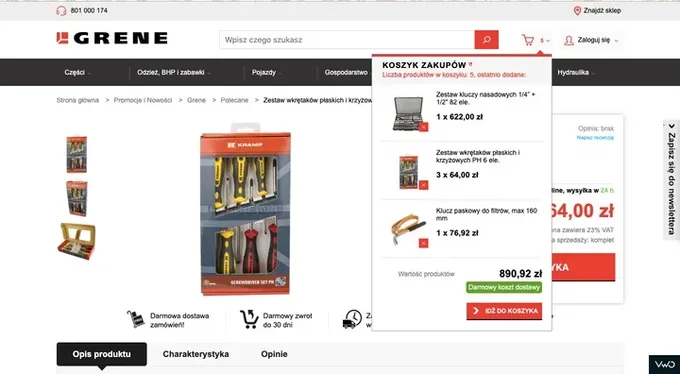
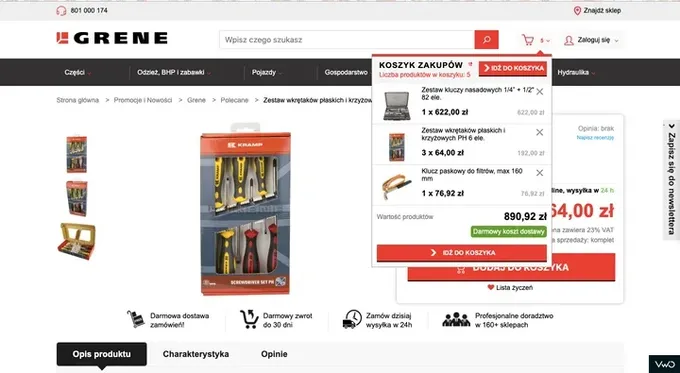
Agricultural e-commerce retailer Grene noticed shoppers assumed a "free delivery" message in their mini-cart was clickable, struggled to see per-item totals, and had to scroll to find the checkout button.
- Test: A redesigned mini-cart with a top-anchored checkout button, clearer per-item pricing, and a repositioned "remove" control, tested against the original layout.
- Result: Cart page conversion rose from 1.83% to 1.96%, and total purchased quantity doubled.
- Takeaway: Small mini-cart friction, like unclear pricing or a buried CTA, can suppress not just conversion rate but basket size itself.
Control:
Variation:
Checkout trust signals test
UK metal supplier Metals4U had a checkout flow that lacked visible payment and security reassurance at the point customers were most likely to hesitate.
- Test: Adding payment provider logos and security messaging to a checkout flow that previously had neither.
- Result: A 4.8% increase in conversion rate from that single change.
- Takeaway: Trust signals often matter more than visual polish, particularly at the exact moment a customer is deciding whether to hand over payment details.
Product page visibility test
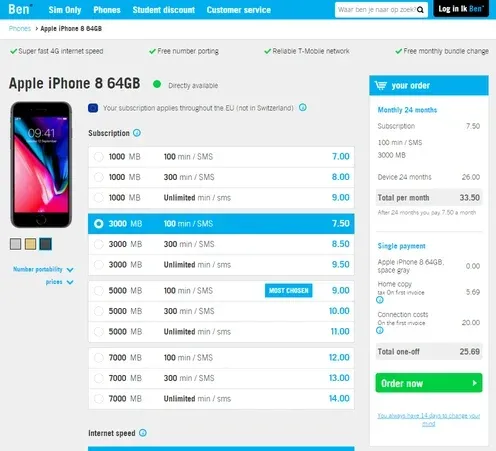
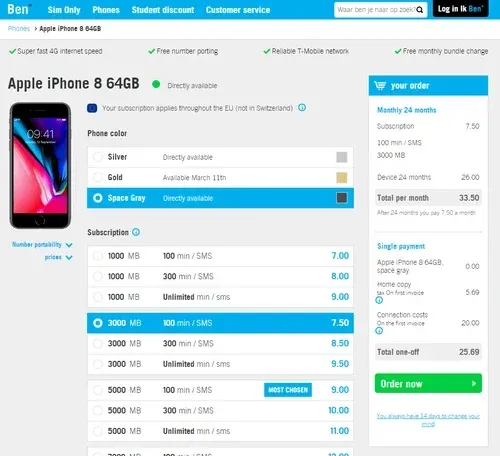
Dutch telecom retailer Ben found that most site visitors never noticed they could choose a phone color alongside their data and voice plan, since the color palette sat below the product image and was easy to miss.
- Test: Moving the color palette selector to sit directly next to the product image instead of below it, tested against the original placement.
- Result: A 17.63% increase in conversions, along with a drop in customer service calls asking how to change device colors.
- Takeaway: A feature customers can't easily see functions the same as a feature that doesn't exist. Visibility, not just presence, is what drives usage.
Control:
Variation:
Guest checkout prominence test
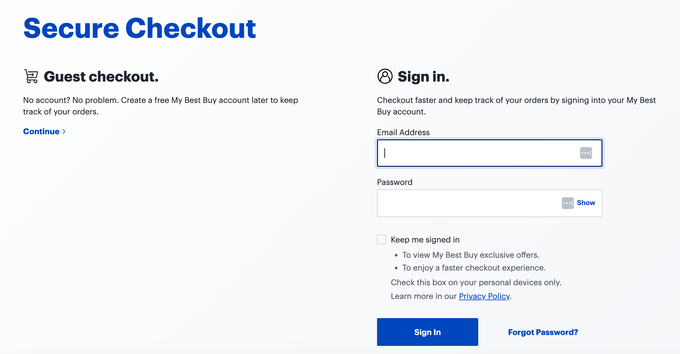
Best Buy addressed a common source of checkout hesitation directly, the assumption that checking out requires creating an account.
- Test: Placing guest checkout as an equally prominent option alongside account sign-in on the very first checkout screen, rather than requiring visitors to search for it or opt out of an account-first flow.
- Result: A pattern used in production at scale, addressing the exact friction Baymard Institute's checkout research flags as a common cause of abandonment, even without a single published lift number attached.
- Takeaway: Not every worthwhile test needs a headline result to be worth running. Removing a well-documented source of friction is reason enough to test it.
Checkout form field reduction test
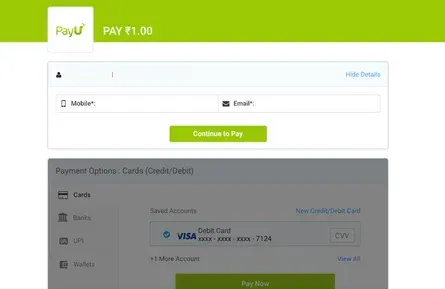
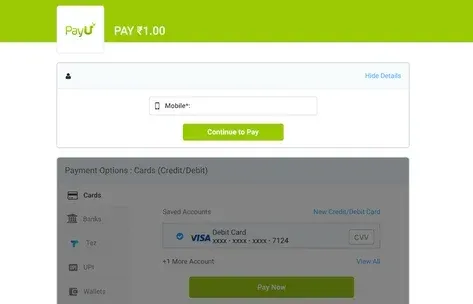
Payment platform PayU found a large share of checkout visitors dropping off after being asked for both a mobile number and an email address.
- Test: A checkout form that asked only for a mobile number, tested against the original version requiring both a mobile number and an email address.
- Result: A 5.8% increase in checkout conversions from removing a single field.
- Takeaway: The fastest way to lose a customer at checkout is asking for information you don't strictly need. Every additional field is a fresh chance to abandon.
Control:
Variation:
Romi Hector , CRO Specialist at CROforce
» Want a managed program to optimize your highest-impact pages? Talk to a CROforce expert
Common e-commerce A/B testing mistakes to avoid
Most failed testing programs aren't failing because of bad ideas. They're failing because of process gaps that compound over time.
- Testing without a clear hypothesis: Changing a page "to see what happens" produces a data point with no explanatory power. Every test should follow the format: if we change X, Y should improve, because Z.
- Stopping tests too early: Ending a test the moment a variation pulls ahead, rather than waiting for statistical significance, leads to false positives that don't hold up once you scale a "winner" storewide.
- Ignoring device and segment splits: A result that looks strong in aggregate can hide a variation that actually hurts mobile users or new visitors specifically.
- Testing during promotional periods without accounting for it: Black Friday traffic, flash sales, and even payday spikes behave differently than baseline traffic, and treating that data as representative skews future decisions.
- Running too many overlapping tests: Testing multiple changes on the same page or overlapping user segments at once makes it impossible to attribute results to a specific cause.
- Prioritizing low-traffic pages first: Testing on pages without enough volume means waiting weeks or months for a result that may never reach significance.
Tools and support for running e-commerce tests
The right testing setup depends heavily on your platform, traffic volume, and whether you have in-house development resources to build and QA variations. A few categories cover most needs:
- Visual editors: Good for simple client-side changes like copy, images, or layout tweaks, without needing a developer for every variation.
- Server-side testing: Needed for deeper changes like pricing logic, checkout flow, or anything that touches backend functionality, since client-side tools can't reliably alter these without flicker or performance issues.
- Full experimentation suites: Combine testing with segmentation, statistical significance calculators, and reporting, which matters once you're running more than a handful of tests at a time.
- Managed testing services: Bundle the platform with strategy, build, QA, and analysis, useful for teams that want the rigor of a mature testing program without hiring an in-house experimentation team.
Picking the wrong category is one of the most common reasons e-commerce testing programs stall. A store trying to test checkout logic with a purely client-side visual editor will hit walls that have nothing to do with the quality of the hypothesis. That's why it's worth comparing A/B testing tools against your platform and traffic before committing to one.
» Want the strategy and tools handled for you? See CROforce's A/B testing services
Building a testing program that compounds
A single winning test is a nice result. A testing program is what actually changes your revenue trajectory. Each result, win or loss, sharpens the next hypothesis. That requires a backlog built on analytics and user behavior, a prioritization process that puts high-traffic, high-friction pages first, and enough testing velocity to keep learning faster than your competitors.
» Need help building your e-commerce testing roadmap? Book a demo
FAQs
What is e-commerce A/B testing?
E-commerce A/B testing is the practice of showing two versions of a storefront page, such as a product page, cart, or checkout step, to separate groups of visitors to measure which version drives more conversions, revenue, or average order value.
What should I A/B test first on my e-commerce site?
Start with your highest-traffic pages that also show the most drop-off in your analytics, typically the product pages and checkout steps that carry the bulk of your sessions. Testing low-traffic pages first usually means waiting far too long for a statistically valid result.
How long should an e-commerce A/B test run?
Long enough to reach a 95% confidence level, and ideally across at least one to two full business cycles to smooth out day-of-week effects. Avoid drawing conclusions from tests that only span a promotional period or sale.
Do I need a lot of traffic to A/B test my online store?
You need enough traffic to reach statistical significance within a reasonable timeframe, which depends on your baseline conversion rate and the size of the change you're testing. Very low-traffic pages may take months to produce a valid result, so prioritizing high-volume pages first is usually the better approach.
Can small e-commerce stores benefit from A/B testing?
Yes, though smaller stores may need to focus on higher-impact changes and longer test durations to compensate for lower traffic. A managed CRO program can help prioritize which tests are worth running given a store's specific traffic level.