
E-commerce checkout optimization: 10 strategies to reduce cart abandonment
70% of shoppers abandon at checkout. Fixing it starts with guest checkout, transparent pricing, and fewer form fields, not a full redesign.






Updated March 12, 2026

You’ve spent thousands driving traffic to your store. Your product pages are converting. Customers add items to their cart, and then they disappear.
If this sounds familiar, you’re not alone. The average e‑commerce cart abandonment rate is around 70%, meaning roughly seven out of ten shoppers who add items to their cart never complete the purchase. That’s not a minor leak in your funnel; it’s lost revenue.
Most of these abandonments aren’t about price or product fit. They’re about checkout friction. And checkout friction is fixable.
What checkout optimization really means
E-commerce conversion optimization for checkout means eliminating the obstacles that prevent shoppers from completing their purchase. It focuses on:
- Reducing form fields: Baymard Institute's checkout research shows the average checkout contains 12.8 form fields, but most sites can function with just 6-8 essential fields when they remove non-critical inputs and use address lookup. Every unnecessary field is another chance for abandonment.
- Simplifying navigation: Streamline the path from cart to confirmation by removing steps, reducing page loads, and making the flow feel effortless.
- Adding payment flexibility: Offer multiple payment options, including digital wallets, buy now pay later, and traditional methods, so customers can pay however they prefer.
- Building trust at critical moments: Display security badges, clear policies, and trust signals exactly when customers hesitate before entering payment information.
Why checkout optimization moves your bottom line
Baymard’s large-scale checkout usability research indicates that fixing checkout UX issues alone can increase checkout conversion rates by an average of 35.26% and represents roughly 260 billion dollars in recoverable lost orders across the US and EU e-commerce markets.
Even among large and mature retailers, the same research continues to identify dozens of actionable issues in checkout flows.
The top reasons for cart abandonment:
- Unexpected extra costs drive abandonment: This includes shipping, taxes, and fees.
- Forced account creation: A common friction point frequently cited as a reason for checkout abandonment.
- Complex or lengthy checkout processes: Too many steps or fields cause a significant share of users to drop off.
- Security and trust concerns: Creates abandonment when shoppers don’t feel confident entering their payment details.
Erin Choice , CRO Specialist at CROforce
How to optimize your checkout flow and stop losing sales
1. Offer guest checkout and delayed account creation
Forced account creation is one of the most consistently identified sources of checkout friction in recent cart abandonment analyses and merchant guides. Shoppers who are ready to buy do not want to stop and create an account; they want to complete their purchase and move on.
A better approach is to:
- Make guest checkout the default path: This lets anyone purchase without registering first.
- Offer post-purchase account creation: Do this on the confirmation page, phrased as “Save your details for faster checkout next time”, using information they already entered.
- Clearly state the benefits of an account: Such as order history, faster checkout, saved addresses, and exclusive offers, without making registration feel mandatory.
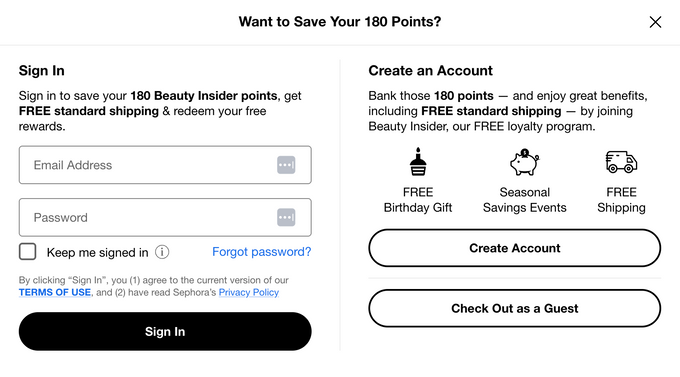
For example, Sephora lets you sign in, create an account, or simply “Check Out as a Guest,” and clearly states the benefits of joining its loyalty program, such as earning points and getting free standard shipping.
2. Reduce form fields to the bare minimum
Typical checkouts still ask for more information than is strictly required, and many flows can be reduced to 6 to 8 fields without impacting fulfillment. They also report that complexity in checkout, including overly long forms, contributes directly to abandonment.
To simplify your forms:
- Remove or defer non-essential fields: These include company name, secondary phone number, and marketing preferences. Move them into post-purchase flows where possible.
- Combine and streamline fields: Provide a clear “billing same as shipping” checkbox instead of asking for duplicate address entry.
- Implement address autocomplete/browser autofill: These labels reduce typing time, especially on mobile.
- Use inline, real-time validation: With clear messaging so errors are caught early and explained in plain language, for example, “Card number should be 16 digits”.
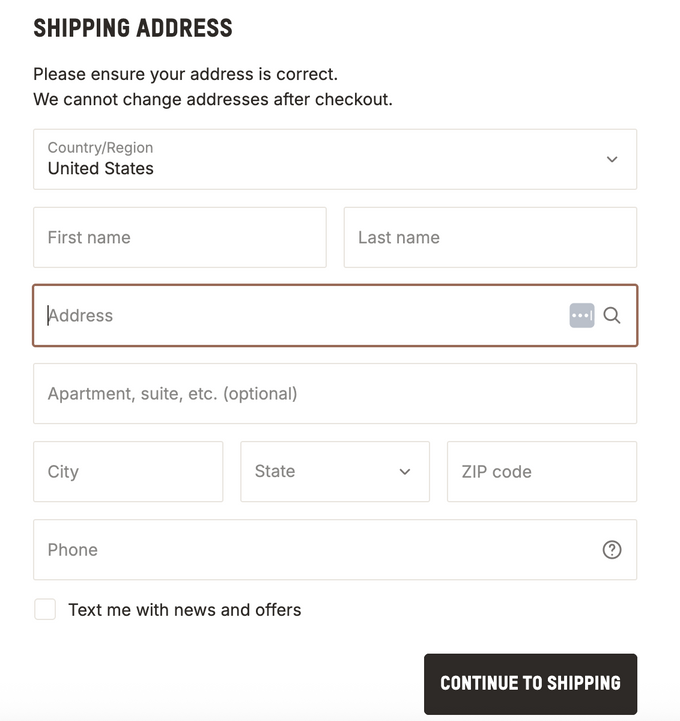
For example, SKIMS’ shipping address step keeps fields focused on what is essential to fulfill the order, uses optional labeling for secondary information like apartment or suite, and supports address search so customers can complete the form faster with fewer keystrokes.
3. Display all costs upfront
According to Statista, in 2025, almost 40% of U.S. consumers abandoned an online purchase during checkout because of additional costs such as shipping, taxes, or fees. Shoppers are much more sensitive to unexpected charges than to charges that were clearly disclosed from the start.
Best practices include:
- Show estimated shipping and tax: Do this as early as possible, ideally on the cart page or immediately after a customer enters a postal code.
- Keep a sticky order summary: This should be visible during checkout so customers can always see subtotal, shipping, tax, and total.
- Use clear cost breakdowns: Avoid surprises and don’t hide handling fees or add-ons at the final step.
- Highlighting free shipping thresholds: For example, “You’re $50 away from free shipping”, which can encourage some users to add an item instead of paying for shipping.
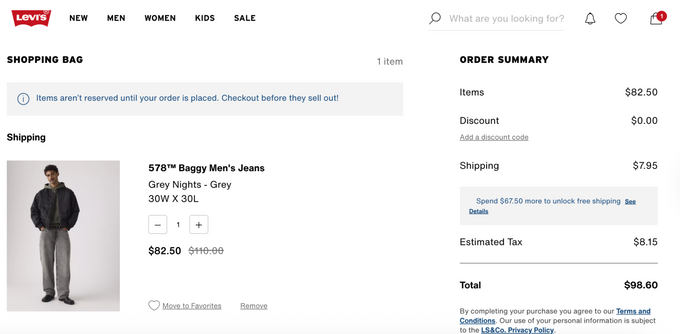
For example, Levi's® shopping bag view keeps a clear order summary on the right, breaks out items, discounts, shipping, estimated tax, and total, and also highlights how much more the customer needs to spend to unlock free shipping, so there are no surprises later in checkout.
4. Integrate express payment options
Digital wallets and express payment methods reduce friction by cutting out manual entry and using stored credentials. In 2025, Stripe published an experiment measuring the impact of enabling more than 50 global payment methods and modern wallets in its Optimized Checkout Suite.
In that study, businesses that surfaced at least one additional relevant payment method beyond cards saw a meaningful increase in conversion and revenue.
Stripe’s breakdown further highlights that digital wallets, including Apple Pay, delivered some of the strongest gains. External commentary on the same experiment notes that Apple Pay on its own drove roughly a 22 percent conversion lift in the sample.
For 2026, you should prioritize:
- Apple Pay for iOS and Safari users: Use an express option placed near the top of the checkout stage, where supported.
- Google Pay for Android and Chrome users: To offer a comparable low-friction experience across devices.
- PayPal/other trusted digital wallets: For customers who prefer not to share card details with each individual merchant.
- Platform native accelerated checkouts: Use solutions like Shop Pay when your e-commerce platform offers its own optimized, widely used checkout experience.
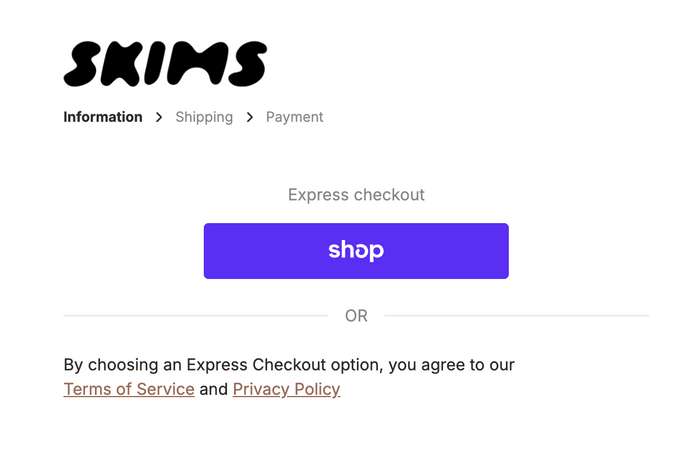
For example, SKIMS places a bold “Express checkout” block at the top with a single prominent Shop Pay button, letting returning customers complete the purchase in one tap before they ever see the standard form fields below.
Erin Choice , CRO Specialist at CROforce
5. Build trust with security signals
Security concerns and trust gaps appear repeatedly in abandonment research and are regularly cited in current cart abandonment statistics and surveys. Users hesitate when they are not sure whether a site is legitimate or whether their payment data will be handled securely.
Modern trust-building focuses less on generic security seals and more on clarity and recognizability:
- Ensure entire checkout runs over HTTPS: This should include a visible lock icon and a consistent domain. Any mixed content warnings or unexpected redirects can severely damage confidence.
- Display recognized payment logos: This includes card networks, PayPal, and wallets, near the payment section. Familiar brands act as implicit trust anchors.
- Use plain language security and privacy copy: For example, “Your payment is encrypted and processed securely. We never store your full card number”, instead of vague marketing claims.
- Make returns, refund policies, and support options visible: It should be clearly linked from checkout so users know what happens if something goes wrong.
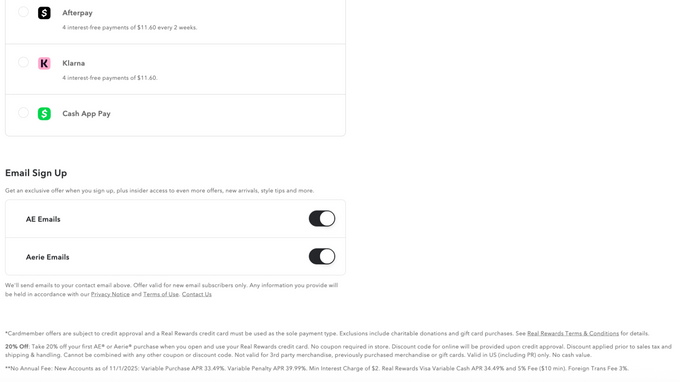
For example, American Eagle’s checkout shows trusted payment options like cards, wallets, and buy now, pay later providers alongside a clear order total. It reinforces trust just below with concise copy about its rewards program, free returns window, and standard shipping costs so shoppers know exactly what they're agreeing to before ordering.
6. Optimize checkout for mobile users
Mobile devices drive 57% of global e-commerce sales, but mobile checkout abandonment rates remain higher than desktop. The issue isn't that mobile users are less ready to buy-it's that most checkouts aren't optimized for small screens.
Do this to optimize your mobile checkout flow:
- Use a single-column layout: Avoid horizontal scrolling, cramped grids, or tiny tap targets. Primary tap targets should be comfortably large for thumbs.
- Trigger the correct keyboard types: Such as numeric for card numbers, phone numbers, and postal codes, and use auto-advance where it makes sense.
- Support autofill and mobile wallets: This lets users bypass manual form filling entirely.
- Limit mobile checkout to the minimum fields: Often aligns with the reduced field counts Baymard shows are possible when you use address lookup and collapse optional fields.
- Implement persistent carts: This lets items remain saved across sessions and devices, which reduces the penalty for interruption.
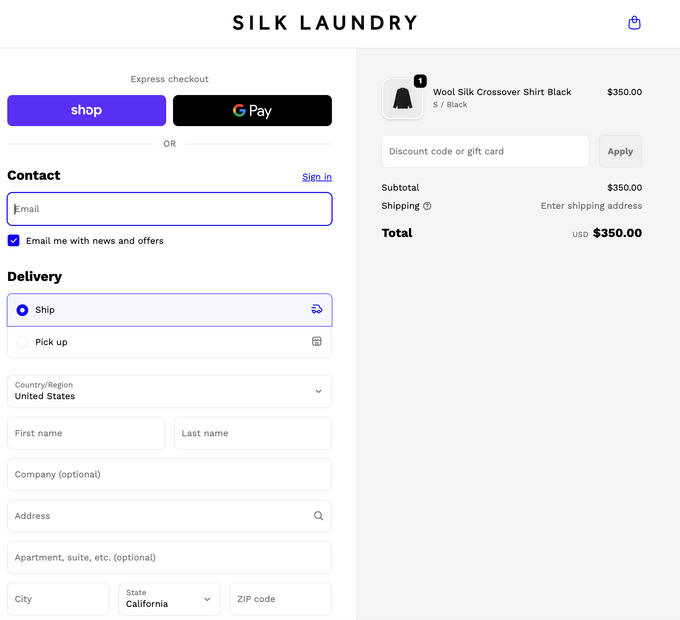
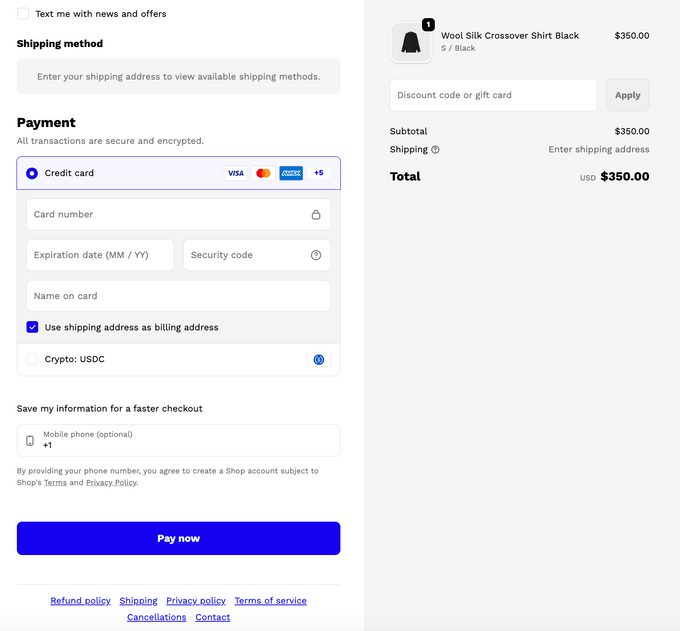
For example, Silk Laundry uses a single column layout with large tap targets, keeps contact, delivery, and address fields in a clean vertical flow, and places an inline order summary and “Pay now” button at the bottom along with policy links, so shoppers can review key details and complete the purchase without pinching, zooming, or hunting around the page.
7. Use progress indicators for multi-step checkouts
If your checkout spans multiple pages or sections, users need to know where they are in the process and how close they are to finishing. Unclear or seemingly endless flows increase anxiety and abandonment. Modern guidance on reducing cart abandonment consistently includes clarifying checkout steps as a key tactic.
Effective progress indicators:
- Combine a simple visual progress bar with descriptive step names such as “Shipping”, “Payment”, and “Review”.
- Show explicit step counts, for example, “Step 2 of 3”, so users understand that the process is finite.
- Mark completed steps clearly and allow users to go back to edit information without losing data.
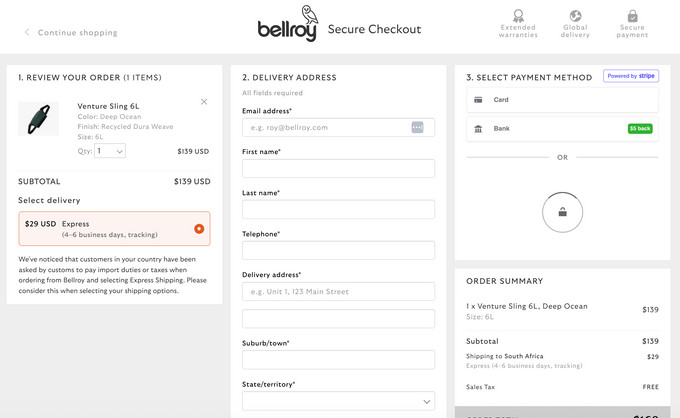
For example, Bellroy’s checkout page is visually divided into three numbered columns for “Review your order”, “Delivery address”, and “Select payment method.” Shoppers can immediately see where they are in the process and what comes next.
8. Enable persistent shopping carts
Nothing frustrates customers more than adding items to their cart, leaving your site, and returning to find it empty. Persistent carts save items even after browsers close or sessions expire, allowing customers to return and complete purchases whether they left to compare prices or simply got distracted.
Store cart contents in browser cookies for returning visitors, save carts to customer accounts for cross-device access, and keep carts active for at least 30 days to accommodate longer purchase consideration periods.
9. Show clear error messages and real-time validation
When customers make mistakes entering information, your checkout should catch and correct these issues immediately. Waiting until they click submit to show multiple error messages creates frustration and often leads to abandonment.
Check each field as customers move to the next one, show green checkmarks for correct information and red highlights for errors, explain exactly what's wrong with specific messages like "Your credit card number should be 16 digits," and auto-format entries like credit card numbers with spaces and phone numbers with dashes.
10. Simplify shipping options
Delivery speed, cost, and clarity are central to purchase decisions. Contemporary cart abandonment content and platform documentation list slow, unclear, or unexpectedly expensive delivery as key reasons for a user to back out.
You can improve shipping UX by:
- Show specific dates: Use clear delivery dates instead of vague ranges, for example, “Arrives by Thursday, 13 February” instead of “2 to 3 business days”, where your logistics allow.
- Pre-select the best option: Pre-select the most popular or cost-effective shipping option while still clearly displaying all available speeds and prices.
- Surface costs early: Surface shipping costs early, ideally on the cart page and at the start of checkout, rather than only at the end.
- Highlight free shipping: Highlight how close the order is to free shipping and keep free shipping messaging consistent across product pages, the cart, and checkout.
How small checkout wins compound
Individual improvements deliver small gains. Guest checkout might add 8%. Express payments add 12%. Fewer form fields add 10%. But these changes multiply because they fix friction at multiple checkout stages.
Baymard found that fixing checkout usability issues increases conversions by 35.26%. Stripe showed that properly positioning digital wallets lifts conversions materially. Combine these with mobile optimization, trust signals, and transparent shipping, and double-digit conversion increases become realistic.
The math:
- Your store gets 10,000 monthly cart additions
- Current 30% conversion = 3,000 purchases
- Improving to 40-45% conversion = 1,000-1,500 additional monthly orders
- At $100 average order value = $100,000-$150,000 extra monthly revenue
- Annual impact = $1.2-$1.8 million
Your checkout is the final hurdle between browsing and buying. Make it easy. Make it fast. Make it trustworthy.
FAQs
What is a good checkout conversion rate for ecommerce?
A “good” checkout conversion rate varies by industry, but many well‑optimized stores convert about 40–60% of carts into orders once you exclude casual browsers. The key is to know your current cart‑to‑completion rate and focus on improving that number over time.
What are the biggest causes of cart abandonment at checkout?
The main drivers are unexpected extra costs (shipping, taxes, fees), forced account creation, long or confusing forms, and low trust in payment security. If you tackle those four areas first, you usually see the fastest reduction in abandonment.
How many form fields should my checkout have?
Most sites use more fields than they need. Many checkouts can be reduced to roughly 6–8 essential fields by removing non‑critical questions and using address autocomplete. Every unnecessary field is another chance for someone to quit.
Do express payment options like Apple Pay really improve checkout conversion?
Yes. Offering digital wallets such as Apple Pay, Google Pay, or PayPal usually lifts conversion because customers can skip typing card details and use stored, trusted credentials. Make at least one relevant wallet easy to find near the top of your payment step.
How can I tell which checkout changes will have the biggest impact
Start by mapping where people drop off: which step loses the most users, and on which devices. Then prioritize changes that remove friction at those points, such as enabling guest checkout, trimming fields, or showing total costs earlier, and track how your cart‑to‑order rate moves after each change.
» Want to know what's killing your checkout completion rate? Talk to a CROforce expert about auditing your flow.