
Shopify CRO: 12 data-driven tips to boost your store's conversion rate
Most Shopify stores convert between 1.4% and 2.0% of visitors, and the biggest gains come from fixing predictable friction points, not from increasing traffic. This guide covers 12 data-backed tactics to help you do exactly that.






Published March 21, 2026

You've built the store. You're getting traffic. But the sales aren't where they should be.
That gap between visitors and buyers is exactly what Shopify CRO addresses. Most Shopify merchants focus most of their energy on driving more traffic. Still, a faster, more cost-efficient path to revenue growth is converting more of the visitors already landing on your store.
Small, targeted improvements to your user experience, product pages, checkout flow, and messaging can compound into meaningful revenue lifts without increasing your ad spend by a single dollar.
This guide covers 12 practical, data-backed tactics for optimizing Shopify conversion rates in 2026, from foundational fixes to advanced personalization and testing strategies.
What is Shopify CRO?
Shopify CRO (conversion rate optimization) is the ongoing process of increasing the percentage of store visitors who take a desired action, whether that's completing a purchase, signing up for a newsletter, or adding a product to their cart. It involves analyzing visitor behavior, identifying where and why people drop off, and making data-informed changes to the store experience to drive better outcomes.
Unlike paid acquisition, which requires ongoing spend to maintain results, CRO improvements are compounding. A better product page or a simplified checkout flow keeps working for every future visitor without additional investment. That's what makes Shopify conversion rate optimization one of the highest-ROI activities available to e-commerce merchants.
Your store's conversion rate is calculated as:
Conversion rate = (number of conversions / total visitors) × 100
So if 5,000 visitors land on your store in a month and 100 complete a purchase, your conversion rate is 2%.
Erin Choice , CRO Specialist at CROforce
What's a good Shopify conversion rate?
Most Shopify stores convert roughly 1.4% to 2.0% of visitors into customers, with the top 20% of stores at 3.2% and the top 10% at 4.7% or above. If your store's conversion rate is below 1%, that's a strong signal that there are meaningful friction points worth investigating. Even moving from 1.5% to 2.5% on a store with 10,000 monthly visitors adds 100 additional sales per month from the same traffic.
The benchmark isn't a fixed target, though. Conversion rates vary by industry, price point, traffic source, and device type. The more useful practice is to track your own baseline and test for improvement, rather than benchmarking against averages that may not reflect your specific store and audience.
Here are 12 tactics to help you get there.
1. Audit your analytics before you optimize anything
The most common CRO mistake is optimizing based on assumptions rather than data. Before changing a single element of your store, make sure your analytics setup is giving you accurate, actionable information about what's actually happening.
Shopify's built-in analytics covers the basics, but a complete Shopify CRO audit typically requires:
- Google Analytics 4 (GA4): Tracks user behavior, session paths, and funnel drop-off at a granular level.
- Heatmaps and session recordings: Tools like Hotjar or Microsoft Clarity show where users click, how far they scroll, and where they get stuck.
- Funnel analysis: Map the full journey from landing to checkout and pinpoint the exact steps where visitors are dropping off.
- Segmentation: Break down performance by traffic source, device type, new vs. returning visitors, and product category to identify where your biggest conversion gaps sit.
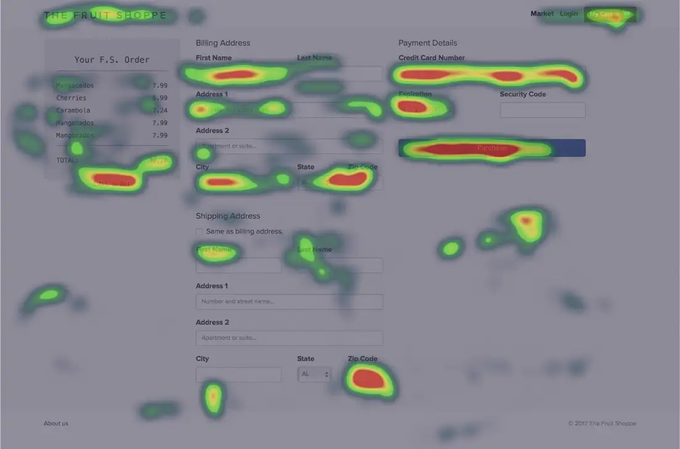
This heatmap from The Fruit Shoppe's checkout page shows exactly the kind of insight heatmap tools surface: heavy interaction on billing and payment fields, but a noticeable drop-off around the shipping address section, pointing to a clear area of friction worth investigating.
2. Optimize your navigation for product discovery
Navigation is one of the most overlooked conversion levers in Shopify CRO. If visitors can't quickly find what they're looking for, they leave, no matter how good your product pages are.
Effective navigation optimization focuses on:
- Intuitive category structure: Organize products the way customers think about them, not the way your inventory is managed. Test your navigation with real users if possible.
- Strategic placement of top-converting categories: Use your analytics data to identify which product categories generate the most revenue and give them prominent positions in your primary navigation.
- Site search with autocomplete and typo tolerance: Many shoppers prefer searching to browsing, especially on mobile. A fast, forgiving search experience that surfaces relevant products quickly is a meaningful conversion driver.
- Mobile-first navigation design: Menus that work well on desktop often break down on mobile. Test your navigation across multiple devices and screen sizes to ensure it's intuitive on touchscreens.
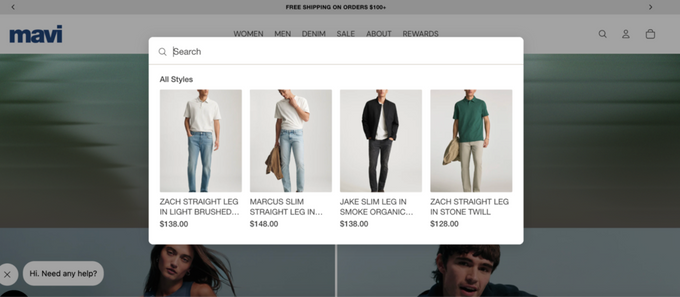
Mavi is a good example of navigation working hard for conversion. Their top nav gives prominent placement to Sale, Rewards, and a resale service, keeping high-intent destinations one click away. Their search bar also surfaces recommended styles with product images before a visitor has finished typing, reducing the steps between intent and product discovery.
3. Optimize product pages for buyer confidence
Your product page is where purchase decisions get made. It's one of the highest-impact areas in Shopify conversion rate optimization, and it's where weak stores most consistently lose sales.
Common product page problems include poor visuals, generic descriptions that don't address buyer objections, missing social proof, and no sense of urgency. Each of these erodes confidence at the exact moment a shopper is deciding whether to buy.
To improve conversion on product pages:
- High-quality, multi-angle visuals: Show the product from multiple angles, in context, and at scale. Aim for at least six images per product, including one lifestyle shot and one that shows size or context. Video works especially well for products where function or fit matters.
- Benefit-led copy: Lead with what the product does for the customer, not just what it is. Address common objections in the description.
- Prominent reviews and ratings: Display them near the add-to-cart button, not buried below the fold. Specific, detailed reviews carry more weight than generic star ratings.
- Scarcity and urgency signals: Low-stock indicators, limited-time offers, or shipping-cutoff countdowns give hesitant buyers a concrete reason to act now rather than later.
- Transparent pricing: Show the total cost, including any fees or shipping estimates, as early in the product page experience as possible.
A/B test one element at a time, starting with your highest-traffic product pages, to build a clear picture of what's actually driving improvement.
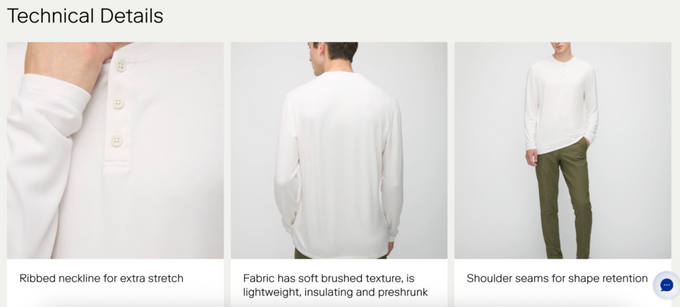
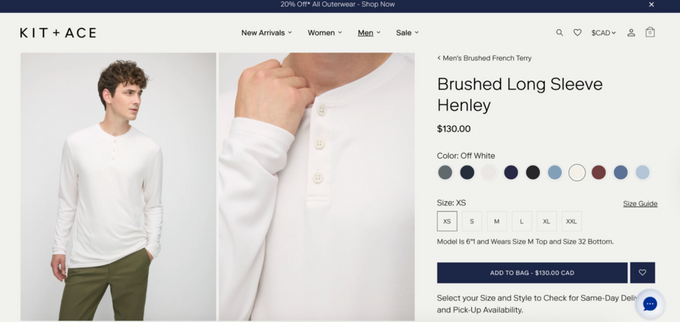
Kit + Ace's product pages are deliberately minimal but work hard within that constraint: a scrolling banner promotes a sitewide discount without disrupting the layout, close-up photography paired with benefit-led captions replaces a generic spec list, and model measurements sit directly beneath the size selector to reduce fit uncertainty at the moment of decision.
» Not sure which tool to run your tests with? See our breakdown of the best A/B testing tools for CRO teams
4. Add trust signals throughout the journey
First-time visitors to your store have no prior relationship with your brand. Trust signals are the cues that tell them your store is legitimate, secure, and worth transacting with. Without them, even well-designed product pages convert poorly.
Key trust elements to add or strengthen:
- Security badges at checkout: SSL indicators and recognized payment provider logos (Visa, Mastercard, PayPal) reduce the security concerns that cause drop-off at the payment step.
- Clear returns and refund policy: Link to it near the add-to-cart button. A visible, no-fuss returns policy removes a major objection for hesitant buyers.
- Real contact information: A visible support email, phone number, or live chat option signals that there's a real business behind the store and that help is available if something goes wrong.
- User-generated content: Photos and videos from real customers carry more persuasive weight than marketing imagery. If you have it, use it.
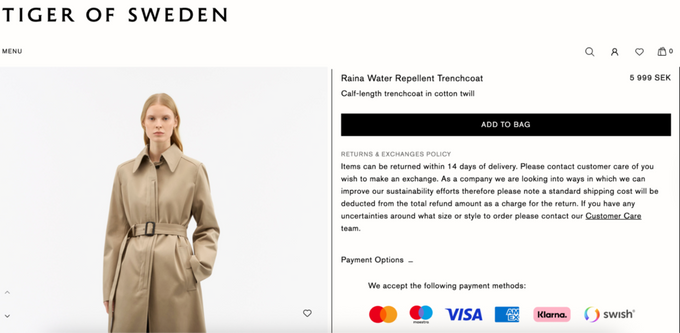
Tiger of Sweden handles two of these well on a single product page: their returns and exchange policy appears in full directly below the add-to-bag button, removing any need to hunt for it, and accepted payment methods are displayed as recognizable logos rather than listed as text, making them scannable at a glance.
5. Improve page speed
Slow pages lose customers before they've seen enough to buy. Every additional second of load time increases the likelihood that a visitor bounces, and this is especially damaging on mobile, where network conditions vary. Even a 1-second improvement in load time can produce measurable conversion gains.
For Shopify CRO, page speed improvements should target:
- Image compression: Large, unoptimized images are the most common cause of slow load times. Use next-gen formats like WebP and compress without sacrificing visible quality.
- App audit: Every installed Shopify app adds code to your storefront. Audit your apps regularly and remove anything you're not actively using.
- Lazy loading: Load images and below-the-fold content as users scroll rather than all at once on initial page load.
- Shopify's built-in CDN: Make sure you're fully utilizing Shopify's content delivery network for asset delivery, especially for product images and videos.
Run your store through Google's PageSpeed Insights to get a baseline score and a prioritized list of what to fix first.
6. Prioritize the mobile experience
Mobile accounts for a large and growing share of Shopify traffic, but mobile conversion rates consistently lag behind desktop conversion rates. Smartphones now account for close to 80% of retail website visits worldwide and generate the majority of online orders.
Yet, mobile sessions still convert at lower rates than desktop due to UX friction. If your store wasn't designed with mobile as the primary experience, you're almost certainly leaving revenue on the table.
Common mobile CRO issues on Shopify include:
- Tap targets that are too small: Buttons and links that work comfortably on desktop become frustrating on a touchscreen.
- Checkout friction on mobile: Long forms and small input fields lead to higher drop-off rates than on desktop.
- Layout that doesn't adapt: Navigation menus, image galleries, and product page layouts all need to be tested and adjusted for smaller screens.
- Slow mobile load times: Mobile connections are less reliable than desktop, making page speed optimization even more critical for mobile visitors.
Test the full purchase flow across multiple mobile devices and varying connection speeds to identify where the experience breaks down.
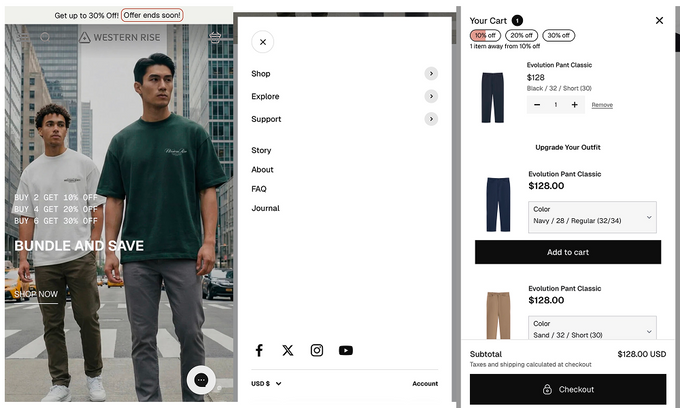
With most of their traffic coming from Instagram, Western Rise's mobile store is built for a frictionless social-to-checkout journey: minimal navigation, fast-loading imagery, and a cart that surfaces bundle discounts and upsell recommendations without adding steps to the path to purchase.
» Getting mobile traffic but not seeing conversions? Talk to a CROforce expert to get a mobile CRO roadmap tailored to your Shopify store
7. Simplify your checkout flow
Checkout is where the most revenue is lost. According to the Baymard Institute, the average online cart abandonment rate is about 70% across e-commerce, based on synthesized data from dozens of studies, and a large portion of that is directly tied to friction in the checkout process.
The most common cause is unexpected costs. Baymard's research shows that about half of shoppers who abandon their carts say extra costs, such as shipping, taxes, or fees, are the main reason. Other major drop-off triggers include being forced to create an account and overly long forms.
To reduce checkout abandonment:
- Enable guest checkout: Remove the account creation barrier for first-time buyers.
- Show total costs early: Display estimated shipping and taxes before the final step, not as a surprise at payment.
- Reduce form fields: Only ask for what you genuinely need to process the order.
- Offer multiple payment options: Shop Pay, Apple Pay, Google Pay, and buy-now-pay-later options reduce friction for buyers who prefer not to enter card details manually.
- Add cart persistence: Save cart contents across sessions so returning visitors can pick up where they left off.
Baymard estimates that better checkout design alone can lift conversion rates by up to 35.26%, making e-commerce checkout optimization one of the highest-return fixes available to most stores.
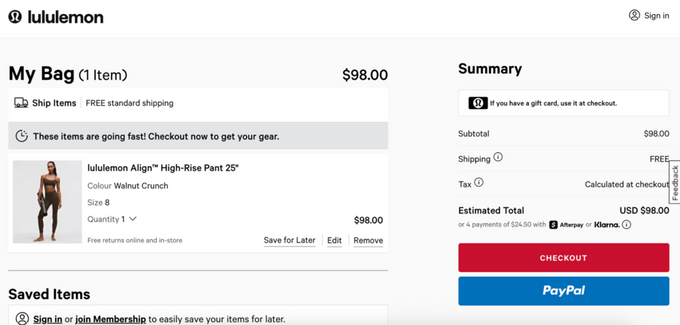
Lululemon's cart page puts several of these into practice at once: free shipping is confirmed upfront, urgency messaging ("These items are going fast!") appears before the checkout button, and BNPL options via Afterpay and Klarna are displayed directly in the order summary, so there are no surprises at payment.
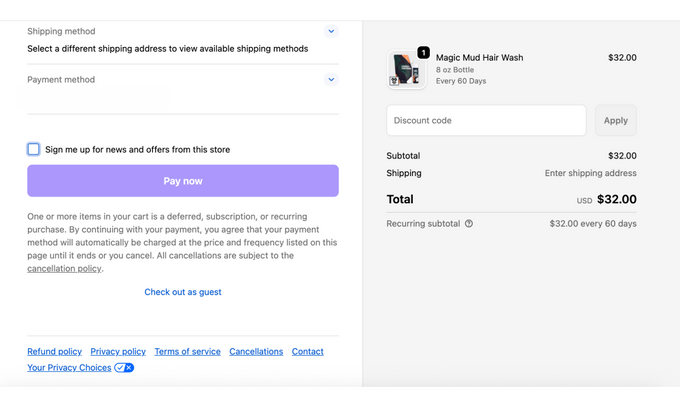
Modern Mammals takes a simpler approach, keeping the checkout page minimal with a single prominent "Pay now" button, a clear order summary, and a visible guest checkout option that removes the account creation barrier entirely.
8. Use free shipping thresholds to drive cart value
Free shipping is one of the most reliable conversion motivators in e-commerce. Shoppers are often more willing to add another item to their cart to qualify for free shipping than to pay a shipping fee, even when the item costs more than the fee.
Implementing and promoting a free shipping threshold on your Shopify store works on two levels:
- Reduces friction at checkout by eliminating the cost that causes abandonment
- Increases average order value by giving shoppers a concrete incentive to spend more
To make this tactic work effectively:
- Display the threshold prominently: Add a shipping progress bar to your cart page and product pages, showing how close the visitor is to qualifying. Visibility is what drives the behavior.
- Set the threshold strategically: Analyze your current average order value and set the threshold slightly above it to encourage incremental spend without making it feel unreachable. If your average order value is $60, for example, a threshold in the $70-$80 range is a reasonable starting point for testing.
- Combine with product recommendations: When a visitor is close to the threshold, suggest relevant products to help them cross it.
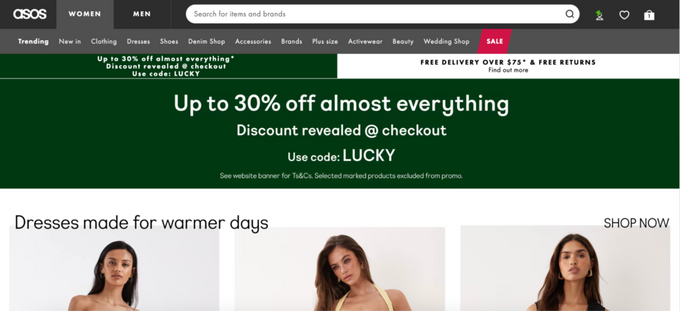
ASOS displays its free delivery threshold ("Free delivery over $75 & free returns") in a persistent banner alongside its sitewide promotion, so both incentives are visible on every page without requiring the shopper to hunt for them.
.9. Optimize landing pages for paid traffic
Visitors arriving from paid ads have different expectations than organic visitors. They clicked on a specific promise your ad made, and if your landing page doesn't immediately fulfill that promise, they'll bounce before they've engaged with your store.
High-converting Shopify landing pages for paid campaigns share a few common characteristics:
- Message match: The headline and lead content of the landing page should directly reflect the ad copy that brought the visitor there. Any disconnect between ad and page raises doubt and increases bounce rates.
- Single, clear call to action: Landing pages with multiple competing options or navigation distractions consistently underperform pages with one focused CTA.
- Benefit-focused content above the fold: Paid traffic can convert quickly, but only when the value proposition is immediately clear. Don't make visitors scroll to understand why they should buy.
- Mobile optimization: A significant portion of paid social traffic comes from mobile devices. Test your landing pages on mobile before launching any paid campaign.
Suri’s toothbrush product page is a strong example of a landing page built for paid traffic because it makes the ad promise instantly tangible. Above the fold, shoppers see clear lifestyle and close-up visuals that show the brush, color options, and accessories, so there’s no ambiguity about what they clicked on.
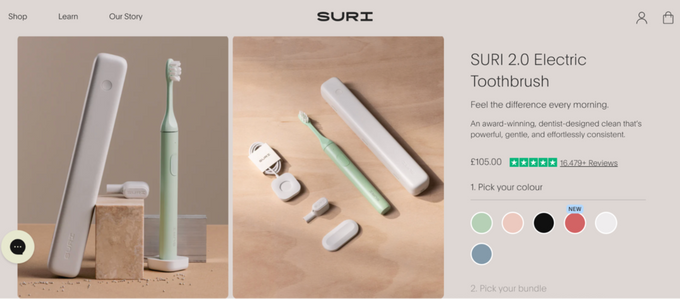
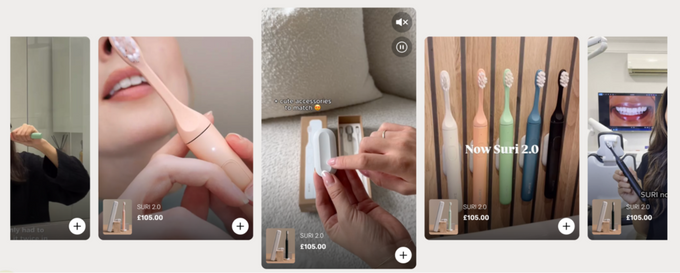
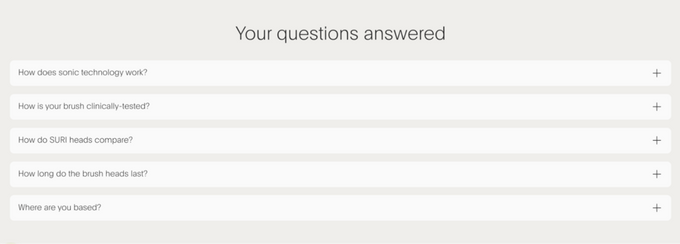
The page reinforces key value props like design, performance, and sustainability through concise copy blocks, comparison tables, and FAQs that address common objections. Structured sections move visitors from hero images and social proof into detailed benefits while keeping a single purchase-focused CTA visible throughout.
10. Personalize the shopping experience
Generic stores convert at generic rates. Personalization allows you to tailor what visitors see based on their behavior, browsing history, traffic source, or location, and it's one of the most powerful levers in Shopify conversion rate optimization when implemented well.
Practical personalization tactics for Shopify include:
- Product recommendations based on browsing or purchase history: Showing a returning customer the category they browsed in their last session is more effective than showing them your generic bestsellers.
- Traffic-source segmentation: Visitors arriving from paid social have a different intent and context than organic search visitors. Tailor the landing experience to match where they came from.
- Dynamic homepage content: Adjust featured products, banners, or promotions based on whether the visitor is new or returning.
- Geo-based offers: Display currency, shipping options, and promotions relevant to the visitor's location, particularly if you serve multiple regions.
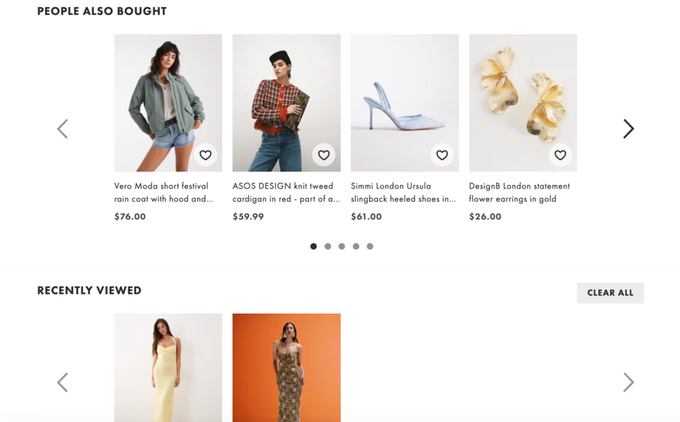
ASOS is a good example of this in practice. Their product pages combine "People also bought" carousels, "Recently viewed" sections, and "You might also like" grids to keep shoppers engaged using data they've already generated simply by browsing.
Erin Choice , CRO Specialist at CROforce
11. Use exit-intent campaigns and cart recovery
Not every visitor who leaves is gone for good. Exit-intent campaigns and cart abandonment recovery sequences are two of the most reliable ways to recapture revenue that would otherwise disappear.
Exit-intent campaigns trigger when a visitor's behavior signals they're about to leave the page. They're most effective when they offer something specific and relevant, not a generic discount. Think targeted offers based on what the visitor was browsing, or a reminder of items sitting in their cart.
For cart abandonment recovery, a multi-channel sequence works best:
- Abandoned cart emails: A sequence of two to three messages typically performs well. The first is a simple reminder, the second may introduce an incentive, and the third creates urgency around a limited offer window.
- SMS follow-ups: Higher open rates than email, especially effective for time-sensitive recovery messages.
- Retargeting ads: Keep your products visible to visitors who showed clear purchase intent but didn't convert on their first visit.
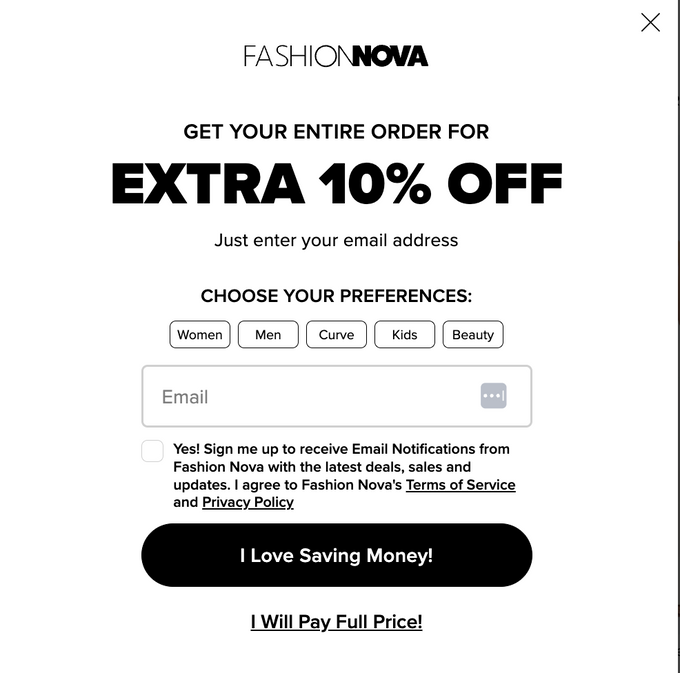
Fashion Nova leads with a bold 10% discount and asks visitors to select shopping preferences before submitting their email, making the offer feel personal.
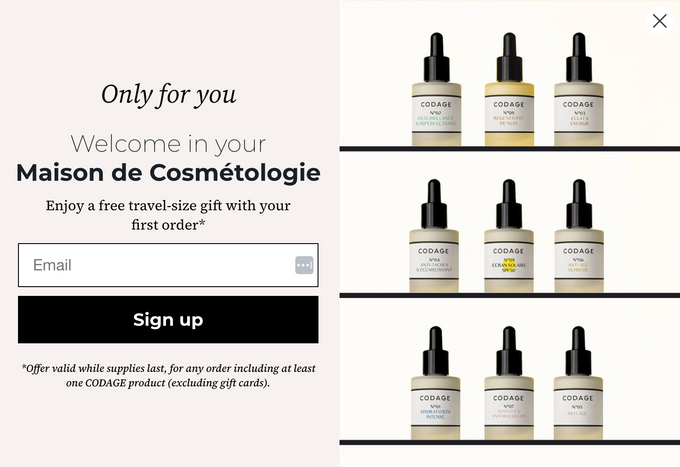
CODAGE skips the discount entirely and offers a free travel-size gift with a first order, letting product imagery carry the pop-up instead.
12. Survey your visitors to find what's actually stopping conversions
Analytics data tells you where visitors drop off. It doesn't always tell you why. Visitor surveys and voice-of-customer research fill that gap and are one of the most underused tactics in Shopify CRO.
Short, targeted surveys placed at key friction points in the funnel can surface objections, confusion, and missing information that no amount of heatmap analysis would reveal on its own.
Practical survey approaches for Shopify stores:
- Exit-intent survey: Ask visitors who are about to leave a single question, such as "What stopped you from completing your purchase today?" The responses often point directly to specific fixes.
- Post-purchase survey: Ask new customers what almost prevented them from buying. This reveals the objections your store is overcoming just barely, and helps you strengthen those moments for future visitors.
- On-page feedback widgets: A low-friction "Was this page helpful?" or "Did you find what you were looking for?" widget on product or collection pages can generate useful directional data at scale.
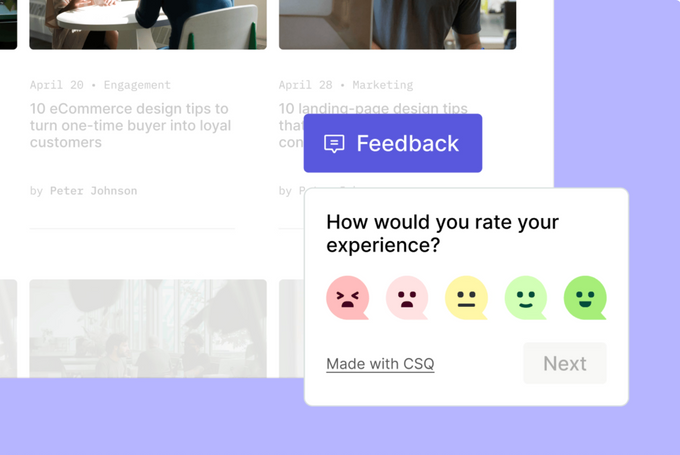
ESW uses a simple emoji scale ("How would you rate your experience?") triggered via a persistent feedback tab, making it easy to capture sentiment without interrupting the browsing session.
Ably (as seen on ConvertFlow) takes a different angle, embedding an open-text question directly on the cart page, "Why did you choose this item?" to capture purchase motivation at the point of highest intent.
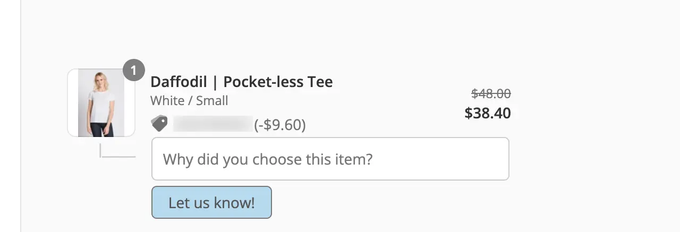
Keep surveys short (one to two questions maximum) and trigger them contextually rather than as a blanket pop-up on every page load.
» Want a Shopify CRO plan instead of guessing what to test? Book a demo with a CROforce specialist
The bottom line
Shopify CRO isn't a one-time fix. It's a systematic, ongoing process of identifying friction, forming hypotheses, testing changes, and compounding small wins over time. The 12 tactics above cover the most common and highest-leverage opportunities available to Shopify merchants, from navigation and product page optimization to personalization, cart recovery, and voice-of-customer research.
The stores that see the biggest gains aren't necessarily making the most dramatic changes. They're the ones who test consistently, follow the data, and keep optimizing the parts of the journey their customers actually care about.
FAQs
What is a good conversion rate for a Shopify store?
Most Shopify stores convert between 1.4% and 2.0% of visitors, with the top 20% of stores closer to 3.2% and the top 10% at 4.7% or above. That said, your own baseline and trajectory matter more than any industry average.
How long does it take to see results from Shopify CRO?
Quick technical fixes, like simplifying checkout or surfacing shipping costs earlier, can show results within days or weeks. A sustained A/B testing or personalization program typically needs 60 to 90 days to generate statistically reliable data.
Where do most Shopify stores lose conversions?
The most common drop-off points are checkout (unexpected costs, too many steps, no guest option), product pages (weak visuals, missing social proof), and mobile (poor layout, slow load times). A funnel analysis in GA4 paired with session recordings will pinpoint which stage is costing your store the most.
Do I need a developer to do Shopify CRO?
Not for most improvements. Shopify's theme editor, native analytics, and app ecosystem cover the majority of tactics in this article without custom development. A managed CRO service is another option if you want expert prioritization without building an in-house team.
What's the difference between Shopify CRO and SEO?
SEO brings more visitors to your store. CRO converts a higher percentage of the visitors already there. They're complementary, but for merchants already running paid acquisition, CRO typically delivers faster and more predictable ROI.