
Mobile CRO in 2026: What's actually moving the needle for conversion rates
Mobile conversion rates are catching up to desktop as brands prioritize speed, streamlined checkout, and mobile-first UX. The biggest wins in 2026 come from page speed optimization, thumb-friendly navigation, and treating mobile as the primary experience.






Updated April 9, 2026

Most marketing teams have responsive websites, mobile-friendly navigation, and fast load times. But their mobile conversion rates remain stubbornly low. The issue isn't a lack of mobile optimization. It's optimizing for the wrong elements.
The brands seeing real mobile CRO gains in 2026 aren't just making things "work" on smaller screens. They're fundamentally rethinking how people shop, browse, and buy on mobile devices.
What is mobile CRO?
Mobile conversion rate optimization (mobile CRO) is the systematic process of improving a mobile website or app to increase the percentage of visitors who complete desired actions. These actions include making purchases, signing up for newsletters, filling out forms, or any other goal that drives business value.
Unlike desktop CRO, mobile optimization requires addressing device-specific constraints: smaller screens, touch-based navigation, variable network speeds, and different user behaviors. Mobile users browse with their thumbs, expect instant load times, and abandon sites that require excessive typing or complicated navigation.
Effective mobile CRO goes beyond making a desktop site responsive. It requires building experiences specifically designed for how people actually use their phones.
Why mobile CRO is critical for your business
Mobile CRO is now non‑negotiable. In 2025, mobile devices drove roughly 80% of e-commerce traffic and generated around two‑thirds of online orders, with U.S. shoppers already making about 44% of their retail ecommerce purchases on mobile.
However, mobile still lags in efficiency. Recent device‑level benchmarks from Statista’s ecommerce panel put the average mobile ecommerce conversion rate at around 2.9–3.0%, while desktop and tablet sessions typically convert at roughly 3.5–4.8%, depending on the dataset and industry.
That gap represents a massive revenue leak. Shoppers are clearly willing to browse and buy on their phones, but most sites still haven’t optimized the mobile journey to actually convert that intent.
How to improve mobile conversion rates
Improving mobile CRO requires addressing the specific friction points that prevent mobile users from converting. These strategies are currently delivering measurable results for e-commerce businesses in 2026.
1. Optimize mobile page speed
Page speed directly impacts mobile conversion rates more than any other factor. Sites loading in 1 second achieve conversion rates 3x higher than sites loading in 5 seconds. A 4-second difference in load time cuts conversion rates by two-thirds.
On mobile devices, the impact intensifies. For every second delay in mobile page load, conversions can drop by up to 20%. A mobile site taking 5 seconds to load instead of 2 potentially loses 60% of conversions before users see any products.
Sites loading in under 2 seconds see the biggest conversion improvements through these tactics:
- Image compression without quality loss: Modern compression tools and next-gen formats like WebP cut file sizes by 25-34% with no visible quality degradation. Large, unoptimized images are the primary cause of slow mobile load times.
- Content delivery networks (CDNs): CDNs reduce load times by 200-500 milliseconds by serving content from servers closest to users. This translates to potential 10-20% conversion rate increases.
- Lazy loading for below-the-fold content: Lazy loading delays image loading until users scroll to them. Only visible images load initially, with additional images loading as users scroll down. This cuts initial page load time in half by reducing upfront data downloads.
Erin Choice , CRO Specialist at CROforce
2. Simplify mobile checkout flows
Baymard’s checkout UX studies show that the average e-commerce checkout still spans about five steps and 11–12 form fields, and its latest cart‑abandonment survey finds that 18% of US shoppers have abandoned an order in the past quarter specifically because the checkout was too long or complicated.
Mobile users face additional friction from typing on small keyboards, correcting autocorrect errors, and navigating between fields. Every unnecessary step or form field increases abandonment risk.
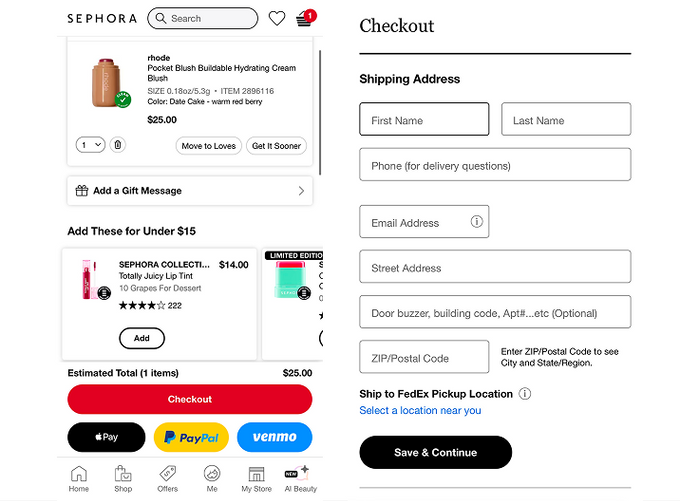
For example: Sephora’s mobile cart keeps the key actions simple and thumb‑reachable: a large ‘Checkout’ button sits at the bottom of the screen alongside Apple Pay, PayPal, and Venmo for one‑tap express checkout. Shoppers can also add low‑priced cross‑sell items (‘Add these for under $15’) with a single tap, without leaving the cart.
The next screen opens directly on a short shipping form with only essential fields and a clear ‘Save & Continue’ button.
Erin Choice , CRO Specialist at CROforce
3. Implement one-tap payment options
One-tap payment options like Apple Pay, Google Pay, and Shop Pay have shifted from premium features to baseline expectations. Recent research from a major consulting firm shows that Shop Pay can boost conversions by as much as 50% compared to standard guest checkout, consistently outperforming other express payment options by double digits.
Mobile users strongly prefer payment methods that eliminate typing. One-tap payments skip the entire process of entering shipping addresses, payment information, and billing details.
For example: Apparel brand Everlane reports that after integrating Shop Pay into its custom e-commerce stack, checkout became noticeably faster. 15% of U.S. transactions were processed via Shop Pay within the first 30 days, and overall checkout conversion for new and previously inactive customers increased, with Shop Pay orders achieving conversion rates of up to 70% in Shopify’s internal measurement of their performance.
4. Optimize payment button placement
Prominent placement of express checkout options dramatically improves mobile conversion rates. Display these payment methods at the top of checkout pages, on cart pages, and on product pages for high-intent items.
On high‑performing mobile checkouts, express wallets aren’t buried at the bottom of the payment step. They’re treated as the default path: wallet buttons appear above the standard ‘Continue to payment’ or card form, and the same buttons are mirrored on the cart and high‑intent product pages.
This simple repositioning increases the share of orders that flow through one‑tap checkout, which shortens the funnel and reduces drop‑off between cart and payment.
5. Optimize mobile forms for completion
Mobile form optimization requires reducing every source of friction. Each form field represents a potential abandonment point.
- Reduce form fields to 6-8 maximum: Combine first and last name fields. Make phone numbers optional. Eliminate any field that doesn't directly enable purchase completion. Sites reducing form fields see immediate improvements in mobile checkout completion.
- Enable autofill and address autocomplete: In A/B tests at Fabletics, adding address autocomplete sped up address entry, reduced errors, and increased new‑customer conversion rates, especially for international orders.
- Use single-column layouts: Multiple columns create cognitive overload on mobile screens. Single-column forms complete faster because users don't need to scan horizontally across their screens.
- Display progress indicators: Progress bars showing "Step 2 of 3" reduce abandonment by showing users how close they are to completion.
6. Design for touch-based navigation
Mobile interface design requires accounting for touch-based interaction rather than mouse clicks.
- Touch target sizing: Buttons and links need minimum dimensions of 48x48 pixels. Smaller touch targets result in mis-taps and user frustration.
- Thumb-friendly navigation: Most users hold phones one-handed and navigate with their thumbs. Place primary actions in the middle or bottom of screens rather than the top corners.
- Sticky elements: Sticky navigation and floating CTAs keep important actions accessible as users scroll. Floating "Add to Cart" buttons eliminate the need to scroll back to the top of product pages.
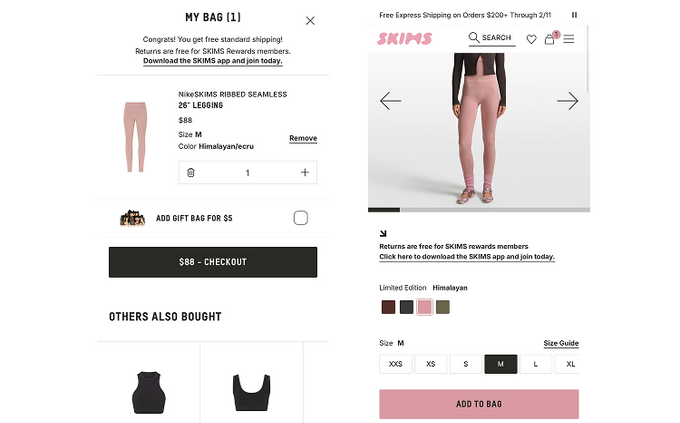
For example: Fashion brands like SKIMS typically use large, thumb‑reachable ‘Add to Cart’ and ‘Checkout’ buttons anchored near the bottom of the screen, sized to roughly meet the 48×48 pixel minimum. This lets users tap primary actions with one hand without precision aiming.
Many also keep a sticky ‘Add to Cart’ or ‘View Cart’ bar visible as shoppers scroll through long product descriptions, so they never have to scroll back up to continue, which reduces drop‑off on smaller screens.
7. Improve mobile site navigation
Clear, intuitive navigation directly impacts mobile conversion rates. Users who can't quickly find products or information abandon sites.
- Simplified menu structures: Mobile menus should contain fewer top-level categories than desktop versions. Prioritize the most popular categories and use search functionality for deeper navigation.
- Prominent search functionality: Search bars should be visible and easily accessible on all mobile pages. Many mobile users prefer search over browsing category hierarchies.
- Clear category labels: Use straightforward, descriptive category names. Avoid clever or ambiguous labels that force users to guess where products are located.
- Breadcrumb navigation: Breadcrumbs help users understand their location within the site hierarchy and navigate back to previous levels without using the browser back buttons.
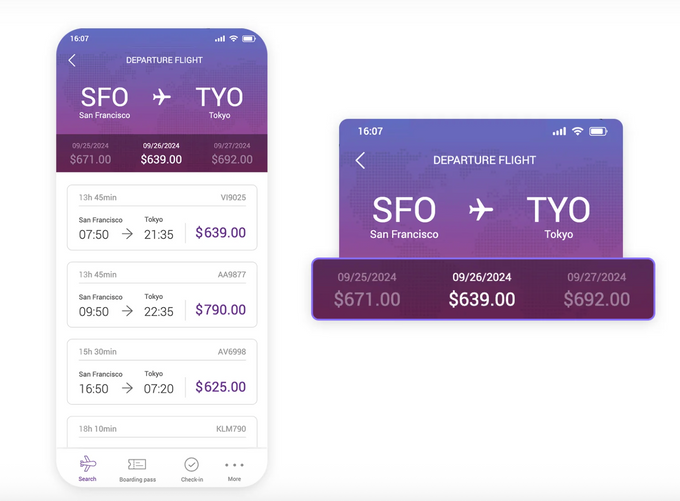
For example: Mobile flight‑booking interface where the route (for example, SFO → TYO) is clearly labeled at the top, with alternative dates and prices displayed in a horizontal strip directly beneath it. Users can immediately see which day offers the best fare, without digging through menus.
Below that, each flight option shows departure and arrival times, total duration, and flight number in a single, scannable card. This kind of layout keeps all key choices visible in one view, reducing navigation effort and helping users quickly move from browsing to booking.
8. Optimize mobile product pages
Product pages represent critical conversion points. Mobile product page optimization requires balancing information density with readability on small screens.
- High-quality product images: Multiple product images showing different angles are essential. Enable pinch-to-zoom functionality for detailed examination. Images should load quickly without sacrificing quality.
- Concise product descriptions: Mobile users scan rather than read long paragraphs. Use short paragraphs, bullet points, and clear headings to organize product information. Place the most important details (price, availability, key features) above the fold.
- Prominent call-to-action buttons: "Add to Cart" and "Buy Now" buttons should remain visible as users scroll. Use contrasting colors to make CTAs stand out from surrounding content.
- Trust signals and social proof: Display customer ratings, review counts, and trust badges prominently. Mobile users rely heavily on social proof for purchase decisions. Show average ratings near product titles and make reviews easily accessible.
- Mobile-optimized videos: Product videos increase conversions, but they must load quickly and play without forcing full-screen mode. Keep videos short (under 60 seconds) and ensure they add value beyond static images.
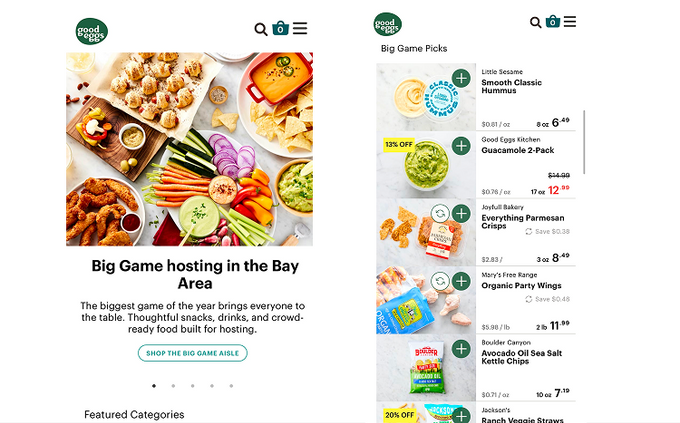
For example: On the Good Eggs mobile landing page, each tile combines a vivid photo with a plain‑language label (like “Big Game Picks” or “Everyday Deals”), so it’s obvious what you’ll get with a quick scan.
Key details, like product name, size, price, and a large “add” button sit side by side, letting shoppers add items straight from the list instead of loading separate pages, which keeps the whole flow fast and cart‑focused on small screens.
Current mobile CRO trends
These developments are shaping mobile conversion optimization in 2026:
- Digital wallet adoption continues accelerating: Nearly half of U.S. consumers now regularly use digital wallets, with adoption rates climbing month over month. Checkout flows without Apple Pay and Google Pay support leave revenue on the table.
- Progressive Web Apps deliver app-like experiences: PWAs provide faster load times, offline functionality, and push notifications without requiring app store downloads. Brands implementing PWAs see improved engagement without installation friction.
- AI-powered personalization adapts in real-time: Leading mobile experiences adapt based on user behavior, displaying different CTAs, product recommendations, and checkout flows based on individual patterns.
Mobile CRO testing priorities
These A/B tests typically deliver the strongest mobile conversion improvements:
- Payment button placement: Test digital wallet options at the top of checkout versus below traditional payment fields.
- Form field reduction: Test variants with 50% fewer fields to determine the minimum required information.
- Checkout step consolidation: Test reducing checkout from 5 steps to 2 steps. Fewer steps consistently win on mobile.
- Mobile-specific copy: Test device-appropriate language like "Buy with Apple Pay" versus generic "Continue to Checkout."
The business impact of mobile CRO
Sites generating $5 million in annual revenue with a 2.5% mobile conversion rate can add $2 million in revenue by improving to 3.5%. This 1 percentage point increase comes from converting existing visitors rather than increasing traffic or marketing spend.
Successful mobile CRO requires three core commitments:
- Eliminate friction systematically: Scrutinize every tap, field, and decision point. Remove elements that don't directly move users toward conversion.
- Test continuously: Run new mobile optimization tests weekly rather than quarterly or monthly.
- Prioritize mobile as primary: Treat mobile as the main shopping experience rather than a desktop afterthought.
The mobile conversion gap stems from priority allocation rather than technical limitations. Mobile already drives the majority of e-commerce traffic and sales.